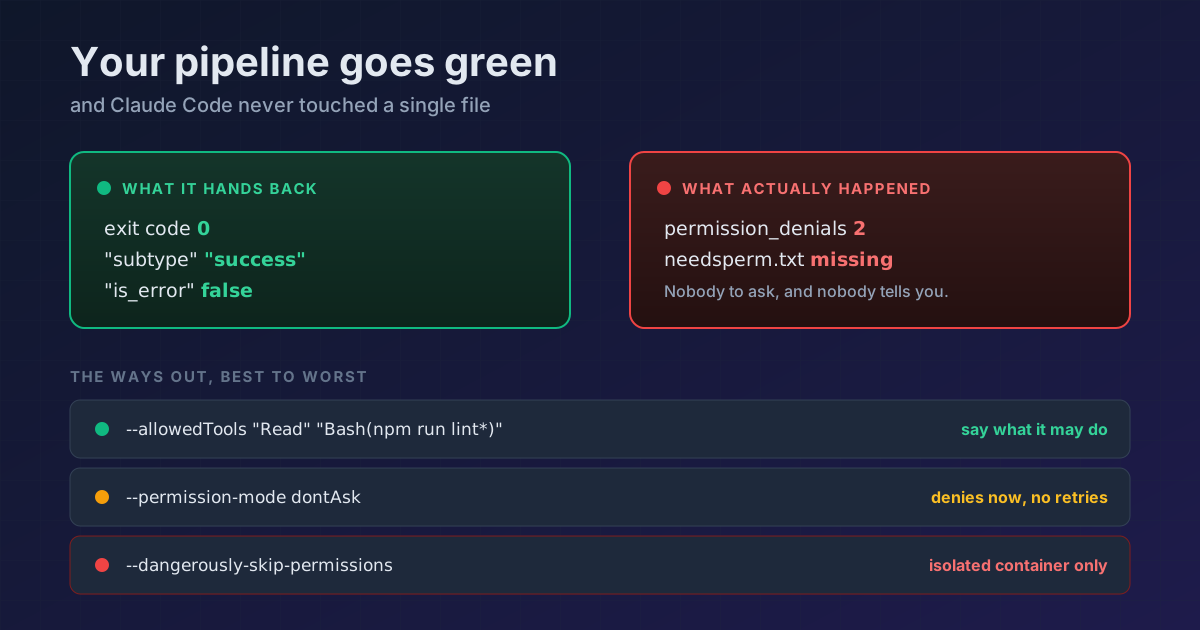
TL;DR In headless mode a denied permission does not fail the run.
claude -preturns exit code0,"subtype": "success"and"is_error": falseeven when Claude never touched a file. The only trace is thepermission_denialsarray in the JSON, which nobody reads. Read it and fail your build yourself. And to let Claude actually work, reach for--allowedTools(state exactly what it may do) or--permission-mode dontAsk(deny fast, no retries) before the--dangerously-skip-permissionsthat everyone ends up pasting.
Your CI job calls claude -p, finishes green, and the commit isn't there. No error, no warning, nothing. You look twice, you can't make sense of it, and you end up where half the internet ends up: pasting --dangerously-skip-permissions into the pipeline so it "stops causing trouble."
It never caused trouble. It went quiet.
What you see, and what actually happened
I ran this in a clean repo, in Manual mode, with a command that isn't in my allow rules:
claude -p "Run this exact shell command and nothing else: touch ./needsperm.txt" \
  --permission-mode default --output-format json
What the run reports back:
EXIT CODE : 0
subtype   : success
is_error  : False
denials   : 2  ['Bash', 'Bash']
file      : NOT created
Exit 0. success. is_error: false. And the file doesn't exist. Claude tried twice, the permission system denied it twice, and the run finished by calling itself a success.
This never bites you in an interactive session: the permission dialog appears and you answer it. With -p there is nobody to ask, so the call is denied and Claude carries on with whatever is left. From the outside, a run that couldn't do its job and one that did it all look identical.
How to catch it, which comes first
The signal is there, just not where you're looking. With --output-format json, every denial is recorded in permission_denials:
out=$(claude -p "$PROMPT" --output-format json)
denied=$(printf '%s' "$out" | jq '.permission_denials | length')

if [ "$denied" -gt 0 ]; then
  echo "Claude was blocked $denied times:"
  printf '%s' "$out" | jq -r '.permission_denials[] |
    "  \(.tool_name): \(.tool_input.command // .tool_input.file_path // "?")"'
  exit 1
fi
Against the run above, that prints:
Claude was blocked 2 times:
  Bash: touch ./needsperm.txt
  Bash: touch ./needsperm.txt
Drop it into the job and your pipeline stops lying to you. This is the part worth copying even if you change nothing else.
And use printf '%s', not echo. The JSON carries \n inside its strings, and zsh (the default shell on macOS) turns those into real newlines, so echo "$out" | jq hands you a parse error that looks like a Claude Code bug and is yours. It works in bash, which is exactly what makes it so annoying to track down.
The four ways out, best to worst
| Option | What it does | Good for |
|---|---|---|
--allowedTools |
Pre-approves exactly what may run | CI where you know what Claude will do |
--permission-mode dontAsk |
Denies anything that would prompt, without waiting | Locked-down pipelines and restricted environments |
--permission-mode auto |
A separate classifier reviews each action | Long tasks where you can't enumerate everything |
--dangerously-skip-permissions |
Skips the checks | Isolated containers and VMs, and nothing else |
1. --allowedTools, your default choice
You tell it what it may do and it does it, no dialogs and no open door to anything else:
claude -p "fix the lint errors" \
  --allowedTools "Read" "Edit" "Bash(npm run lint*)"
Verified against the same probe: with the rule in place, the command runs and the file appears.
2. --permission-mode dontAsk, when you'd rather slam the door
It denies outright everything that would have prompted, and lets through only your allow rules, read-only commands, and whatever a PreToolUse hook approves. The docs pitch it at CI pipelines and restricted environments, and the key phrase is this one: "the session never waits for input."
The practical difference against Manual mode is noise. In my probe, Manual burned 3 turns retrying the denied command; dontAsk cut it off in 2, with no retries.
3. --permission-mode auto, with a ceiling worth knowing about
The auto mode classifier reviews each action instead of asking you. It works well, but in headless mode it has an ending: block 3 times in a row or 20 in total and the session aborts, because there is no one to hand the turn to. That's the error you'll see:
Agent aborted: too many classifier denials in headless mode
4. --dangerously-skip-permissions, which is almost never the answer
It's exactly the same thing as --permission-mode bypassPermissions. And one detail says plenty: the auto mode classifier blocks by default launching an autonomous agent loop with no human approval and no sandbox, and it names this flag as its example. Claude Code stops Claude Code from reaching for it.
What that flag doesn't skip (even though the name suggests otherwise)
There's more nuance here than the name implies. Even in bypass mode, these still stand:
- Your explicit
askrules, which keep opening a dialog - Connector tools your organization set to
ask - MCP tools marked
requiresUserInteraction rm -rf /andrm -rf ~, which still prompt as a circuit breaker, including when buried inside$(...), backticks, or<(...)- Since v2.1.281, a recursive
rmwhose target comes only from a substitution, such asrm -rf "$(pwd)", even with a Bashallowrule
In headless mode that is just one more denial: I ran rm -rf "$(pwd)" with -p and this flag in a throwaway folder, the folder was still there, and the JSON came back with "subtype": "success" and the command inside permission_denials. The detector above catches it. In an interactive session nobody is watching, the dialog waits 2 minutes and, if you don't answer, denies the command with a hint to rewrite it, so the session keeps working. CLAUDE_CODE_DISABLE_DANGEROUS_RM_TIMEOUT=1 turns the wait off.
Plus two refusals that will bite you if you automate:
--dangerously-skip-permissions cannot be used with root/sudo privileges
for security reasons
On Linux and macOS it refuses to start as root or under sudo, unless it's inside a recognized sandbox (what counts as one: a Docker container running as root doesn't). And a background session started with --bg won't start in this mode until you've accepted the responsibility dialog once in an interactive session. A freshly built container has never accepted it.
If instead of the flag you rely on "defaultMode": "bypassPermissions" in the repo's .claude/settings.json, since v2.1.257 it's ignored and the run starts in Manual, with no error: where it has to go now.
Reference
| Mode in headless | What happens when something would need permission |
|---|---|
default (Manual) |
Denied, the run continues, and it finishes as success |
acceptEdits |
Edits and common file commands go through (touch yes, chmod no); everything else is denied just as quietly |
dontAsk |
Denied immediately, no retries and no waiting |
auto |
The classifier decides; aborts after 3 blocks in a row or 20 in total |
bypassPermissions |
Runs, except for the exceptions listed above |
If your world is the interactive session rather than the pipeline, the map is a different one: the 6 permission modes on Shift+Tab for daily work, the sandbox to run without dialogs on a leash for disk and network, and wiring Claude up as an autonomous agent if what you want is to leave it working overnight.
For interactive sessions, this guide ranks the alternatives to --dangerously-skip-permissions so Claude Code stops asking for permission without losing control.
Official docs: Permission modes · Non-interactive mode · CLI reference
Requirements: --permission-mode dontAsk and the other values ship in Claude Code v2.1.x; the manual alias for default needs v2.1.200 or later. I ran every probe in this tip on v2.1.220. The classifier ceilings, the rm -rf circuit breaker, and the two startup refusals come from the current docs rather than from my own runs. The rm -rf "$(pwd)" prompt needs v2.1.281 and I checked it on that version; the 2-minute wait comes from the changelog.

