TL;DR Set
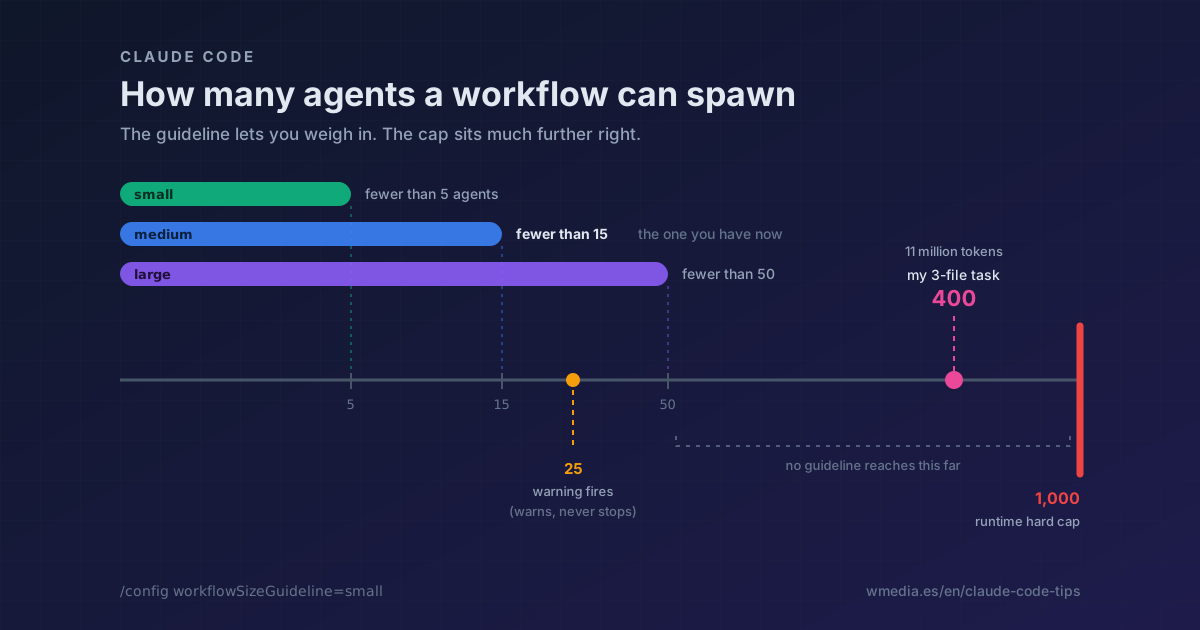
Dynamic workflow sizetosmallin/config(fewer than 5 agents) and raise it in the prompt itself when a task earns it. It is a guideline, not a cap: the real cap is 1,000 agents per run, and the "this is getting big" warning does not fire until 25.
A couple of months ago I kicked off a three-file task. Ninety minutes later it had burned 11 million tokens and spawned close to 400 agents across all its phases, refuters included.
It was not a dynamic workflow. It was a delegate agent I had written myself, with a verifier I had told to escalate whenever it was unsure, and no global budget anywhere. The wrapper does not matter: the failure is the one any fan-out can hit, and it is always the same one. Nobody decided how many agents was too many, so nobody stopped.
There is a dial for that now. When it happened to me, none was set.
What the setting is
A dynamic workflow is a script Claude writes to orchestrate subagents: you describe the task, and the runtime executes it in the background while your session stays free. How many agents come out of that is decided by Claude as it writes the script.
Dynamic workflow size is where you say that number once, instead of repeating it in every prompt.
Result:
# The /config row, untouched
Dynamic workflow size    medium (default)

# Put it wherever you want it
/config workflowSizeGuideline=small

# And the row becomes
Dynamic workflow size    small
Until you choose, every run reminds you with a Running in background · medium size (/config) on its progress line. That note disappears the moment you pick a value, whichever one: it is Claude Code pointing out that nobody has decided yet, not reporting the size to you. (Both views are illustrative, the /config panel is interactive.)
The four values
| Value | Agent count Claude aims for |
|---|---|
small |
Fewer than 5 |
medium |
Fewer than 15 |
large |
Fewer than 50 |
unrestricted |
No guideline: Claude sizes it to the task |
medium is the default, but only since v2.1.219. Before that the default was unrestricted, which is to say none at all, and the setting itself did not exist before v2.1.202. If you have never noticed this row, that is why.
How to set it
1. Once, for every session
/config workflowSizeGuideline=small
You can also open /config and find the Dynamic workflow size row. The change takes effect on your next prompt, no restart involved.
2. Or in a settings file
{
  "workflowSizeGuideline": "small"
}
Valid in any settings file since v2.1.219, and it wins over /config. When a file supplies the value, Claude Code hides the row from the panel so it does not look like something you can change there.
3. Then raise it in the prompt when the task calls for it
use a large workflow to migrate all of src/components to Tailwind
This is the part that keeps a low default from tying your hands. The official docs put it in these words: the guideline goes to Claude as advice, not a cap, so a prompt that calls for a different scale overrides the setting.
Which is why small is a good place to live. Guessing low costs you one more sentence in the prompt. Guessing high costs you what it cost me.
What the setting does NOT do
It stops nothing. It is not a limit, it is a preference riding along in Claude's prompt. If the script ends up asking for more agents, it asks.
The real ceiling sits elsewhere, and that one is hard: 16 agents in parallel at most (fewer on a machine with few cores) and 1,000 agents per run. That number exists precisely so a runaway loop has an ending. Plain subagents, outside a workflow, have had no total cap since v2.1.224: here's how to set one yourself.
And there is a warning, but it arrives late. When a workflow schedules more than 25 agents, or its projected token total passes 1.5 million, its progress line shows a Large workflow flag. It only warns: it does not pause or trim. If you pick a size yourself, its agent count replaces 25 as the threshold. And with ultracode on, the warning never appears, because turning it on is already saying yes to big runs.
For scale: my 400 agents were 16 times the warning threshold, and my 11 million tokens seven times the other one.
The second bite: which model they run on
This is the part almost nobody checks, and it multiplies everything above.
Every agent in a workflow uses your session's model, unless the script routes that stage to a different one or you have CLAUDE_CODE_SUBAGENT_MODEL set.
One correction since this tip went out: that variable stopped winning outright in v2.1.251. It is a default value now, sitting behind the model the script passes and behind the agent definition's own; to impose it you add CLAUDE_CODE_SUBAGENT_MODEL_FORCE=1 (v2.1.257). The reasoning level is handed out separately, because it is saved per model.
My nearly 400 agents all ran on Fable 5 because my session was on Fable 5. I never chose to run 400 agents there: I chose my model once, at the start of the day, and that single decision got replicated 400 times without anyone asking me again.
So check /model before a large run. And when some stages do not need the strongest model (listing files, classifying, collecting), say so while describing the task and Claude will route them to a cheaper one.
Reference
| Aspect | Detail |
|---|---|
| Setting | workflowSizeGuideline · the Dynamic workflow size row in /config |
| Values | small (<5), medium (<15), large (<50), unrestricted |
| Default | medium since v2.1.219; unrestricted before that |
| Nature | Advice riding in the prompt, not a limit |
| Precedence | Settings file > /config |
| Takes effect | On your next prompt |
| Real cap | 16 concurrent agents, 1,000 per run |
Large workflow warning |
Over 25 agents or 1.5M projected tokens; suppressed under ultracode |
| Agent model | Your session's, unless a routed stage or CLAUDE_CODE_SUBAGENT_MODEL, which since v2.1.251 is only a default (add _FORCE=1 to impose it) |
| Requirements | v2.1.202 for the setting, v2.1.219 for the default and the settings key |
And if a run hits your usage limit, since v2.1.271 it pauses and carries on by itself at reset instead of dropping the affected agents.
If what you want is to find out who is eating your quota right now, rather than prevent the next surprise, the other half is in which skill and which MCP are eating your limit.
Official docs: Set a size guideline