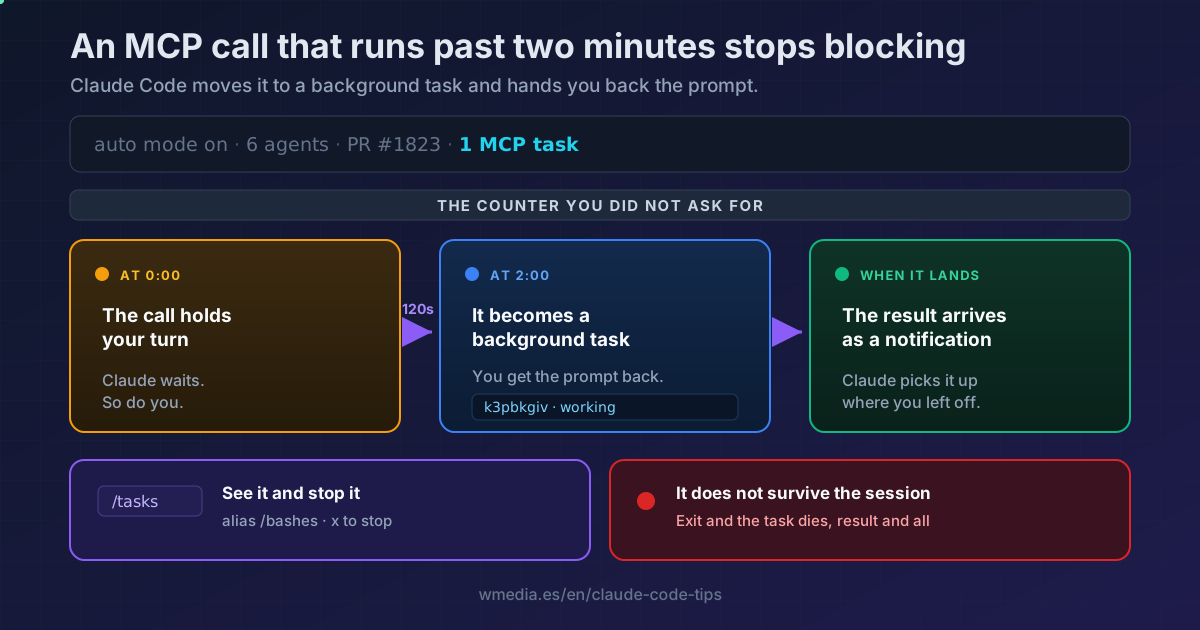
TL;DR From v2.1.212, an MCP call in the main conversation that runs past two minutes stops blocking: Claude Code moves it to the background,
1 MCP taskshows up in your status line, and the result comes back as a notification when it lands. You keep working. The one thing you cannot do is exit the session, because the task does not survive it. To see it or stop it,/tasks.
Until v2.1.212, a slow MCP server held the turn hostage until it answered. Now there is an automatic release: at the two-minute mark, Claude Code registers that call as a background task, gives it an id, and hands you back the prompt. The call stays alive against the server, and when it finishes the result enters the conversation as a notification.
You do not turn this on and you do not ask for it. It is what puts a counter in your status line that you have probably never seen before.
What it looks like
In the status line, next to your agents and the rest of the indicators:
-- INSERT -- ▶▶ auto mode on · ← 6 agents · PR #1823 · 1 MCP task
And the detail, in the /tasks panel:
Background

  MCP tasks (1)
❯ ⧗ claude.ai Atlassian/getJiraIssue · k3pbkgiv · working

↑/↓ to select · x to stop · Esc to close
Server, tool, task id, and state. That k3pbkgiv is the identifier Claude uses to stop it if you ask.
What to do
1. Nothing, and that is the point
Carry on. Claude gets told the moment the call moves, with a message that reads literally like this:
MCP tool "..." is still running after 120s. It was moved to the background as
task k3pbkgiv and keeps running; you'll receive a notification with the result
when it completes. You can keep working in the meantime.
When the call finishes, the result arrives as a task notification and Claude picks it up. If the result is a large attachment (an image, a blob), it does not land whole in your context: it gets written to disk and the notification carries the reference.
2. See it or stop it: /tasks
/tasks
Aliased to /bashes. The panel is titled Background and now has its own MCP tasks section, sitting between Monitors and Cloud agents. Arrow keys to select, x to stop.
3. The limit that bites: it does not survive the session
Exit the session and the task dies with it, result and all. This is not a cloud session or a Routine: it lives inside your process. If you fired something long at Jira, Notion, or your database, that terminal stays open until it comes back.
Backgrounding does not buy the call extra time, either. The server's wall-clock limit still applies (its own timeout or MCP_TOOL_TIMEOUT), and so does the idle cutoff from CLAUDE_CODE_MCP_TOOL_IDLE_TIMEOUT.
4. Move the threshold, or switch it off
The two minutes are an environment variable, in milliseconds:
# Wait five minutes before moving it to the background
export CLAUDE_CODE_MCP_AUTO_BACKGROUND_MS=300000

# Never move it (calls block the turn again)
export CLAUDE_CODE_MCP_AUTO_BACKGROUND_MS=0
CLAUDE_CODE_DISABLE_BACKGROUND_TASKS=1 switches it off too, but it takes every other background task feature with it.
5. What never moves to the background
| Case | Why |
|---|---|
| Calls from subagents | Only the main conversation gets released |
| IDE servers | Excluded by design (sse-ide, ws-ide) |
Non-interactive mode (-p) |
Unless you set CLAUDE_AUTO_BACKGROUND_TASKS=1, since a one-shot run can end before the result arrives |
| A call waiting on an open elicitation dialog | The server is blocked on your answer, not being slow |
Reference
| Detail | Value |
|---|---|
| Default threshold | 120,000 ms (two minutes) |
| Variable to tune it | CLAUDE_CODE_MCP_AUTO_BACKGROUND_MS (ms, 0 disables) |
| Global off switch | CLAUDE_CODE_DISABLE_BACKGROUND_TASKS=1 |
| Where to see it | /tasks (alias /bashes), MCP tasks section |
| How to stop it | x on the selected task |
| States | working, completed, failed, cancelled by the server |
| Persistence | Dies when you exit the session |
| Minimum version | Claude Code v2.1.212 |
This counter lands in the same panel where everything you have running in parallel already converges, and it is the one source that shows up without being asked for. If you are wiring MCP servers right now, start with the setup, and if you have a lot of them connected, here is how to keep them out of your context.
Official docs: Automatic backgrounding of long tool calls

