TL;DR
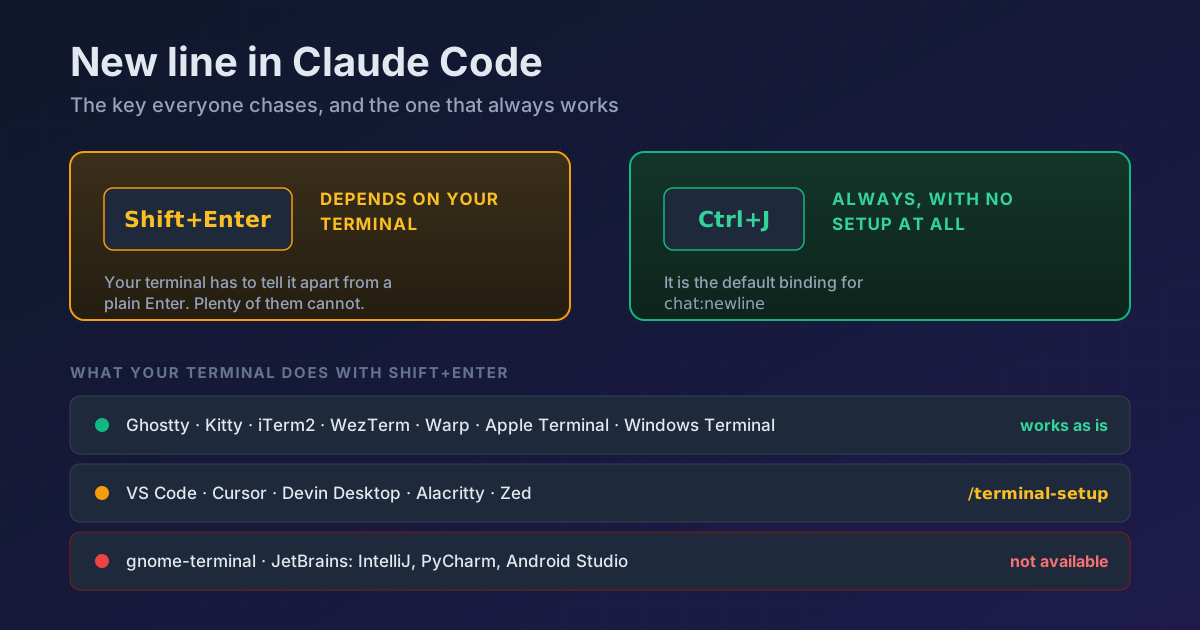
Ctrl+Jinserts a new line in any terminal, with no setup. It is the default binding for thechat:newlineaction. Shift+Enter is the one that depends on your terminal: it works out of the box in Ghostty, Kitty, iTerm2, WezTerm, Warp, Apple Terminal and Windows Terminal; VS Code, Cursor, Zed and Alacritty before 0.16 need one run of/terminal-setup; and in gnome-terminal and JetBrains IDEs it does not exist and never will.
You are halfway through a long prompt, you want a new line, you press Shift+Enter and Claude Code submits the half you had. You go looking and you find an open GitHub issue, three Reddit threads and a JetBrains YouTrack ticket asking for the feature.
Everyone is fighting the wrong key. (On claude.ai and in the desktop app, Shift+Enter just adds a line; this tip is about Claude Code in the terminal.)
Ctrl+J, and that is the whole fix
Ctrl+J          new line, any terminal, no setup
\ + Enter       same thing, if you would rather type it
Enter           submits the prompt
Ctrl+J is not a workaround. It is the default binding for the chat:newline action, the same way Enter is the default for chat:submit. It works everywhere because it does not depend on the terminal: it is a plain control character, not a combination your emulator has to know how to encode.
Shift+Enter is the opposite. For it to reach Claude Code at all, your terminal has to tell it apart from a plain Enter, and plenty of them do not.
What your terminal does with Shift+Enter
| Terminal | Shift+Enter for a new line |
|---|---|
| Ghostty, Kitty, iTerm2, WezTerm, Warp, Apple Terminal, Windows Terminal | Works with no setup |
| foot, Alacritty 0.16 or later and other terminals with the kitty keyboard protocol | Works with no setup (Claude Code v2.1.269+) |
| VS Code, Cursor, Devin Desktop, Alacritty before 0.16, Zed | Run /terminal-setup once |
| gnome-terminal, JetBrains IDEs (IntelliJ, PyCharm, Android Studio) | Not available. Use Ctrl+J or \ then Enter |
If you run Claude Code inside JetBrains, that last row saves you an afternoon. Your setup is not broken. It cannot be done.
/terminal-setup is only for the middle group
In VS Code, Cursor, Devin Desktop, Alacritty before 0.16 and Zed, /terminal-setup writes the binding into your terminal's own config file. The first run answers with something like:
Installed VSCode terminal Shift+Enter key binding
And if it was already there, it says so and changes nothing:
VSCode terminal Shift+Enter key binding already configured
Two warnings worth the afternoon:
Run it in the real terminal, not inside tmux or screen. It needs to write to the host terminal's configuration, and from inside the multiplexer it never gets there.
In VS Code, Cursor and Devin it also touches two editor settings. It sets terminal.integrated.gpuAcceleration to "off", which happens to be the fix for garbled text in the integrated terminal, and it adjusts terminal.integrated.mouseWheelScrollSensitivity. To get GPU acceleration back, set it to "auto" and reload the window.
Inside tmux there is one more layer
Under tmux, Shift+Enter breaks even when the outer terminal supports it. Add this to ~/.tmux.conf:
set -g allow-passthrough on
set -s extended-keys on
set -as terminal-features 'xterm*:extkeys'
Then apply it with tmux source-file ~/.tmux.conf. The two extended-keys lines are what let tmux tell Shift+Enter apart from a bare Enter. The allow-passthrough line is a different fix: it lets notifications and the progress bar reach the outer terminal.
And if you want it the other way round
Some people would rather have Enter insert the line and Shift+Enter send the message. That lives in ~/.claude/keybindings.json, which /keybindings creates or opens for you:
{
  "bindings": [
    {
      "context": "Chat",
      "bindings": {
        "enter": "chat:newline",
        "shift+enter": "chat:submit"
      }
    }
  ]
}
Changes are picked up automatically, no restart. One key to know about: Ctrl+M cannot be rebound, because in a terminal it is literally the same thing as Enter (both send a carriage return).
Reference
| I want | How |
|---|---|
| A new line that always works | Ctrl+J |
| A new line you can type | \ then Enter |
| Shift+Enter in VS Code, Cursor, Zed, Alacritty before 0.16 | /terminal-setup, once, outside tmux |
| Shift+Enter in JetBrains or gnome-terminal | Does not exist. Ctrl+J |
| Shift+Enter inside tmux | extended-keys in ~/.tmux.conf |
| Swap Enter and Shift+Enter | chat:newline and chat:submit in ~/.claude/keybindings.json |
| See or edit your shortcuts | /keybindings |
And if the keyboard matters to you that much, there is a full vim mode inside the prompt, motions and text objects included, plus a way to stop reaching for Escape.
Official docs: Configure your terminal for Claude Code
Requirements: verified on Claude Code v2.1.220. Custom themes and some other keybindings-file options need v2.1.118 or later.