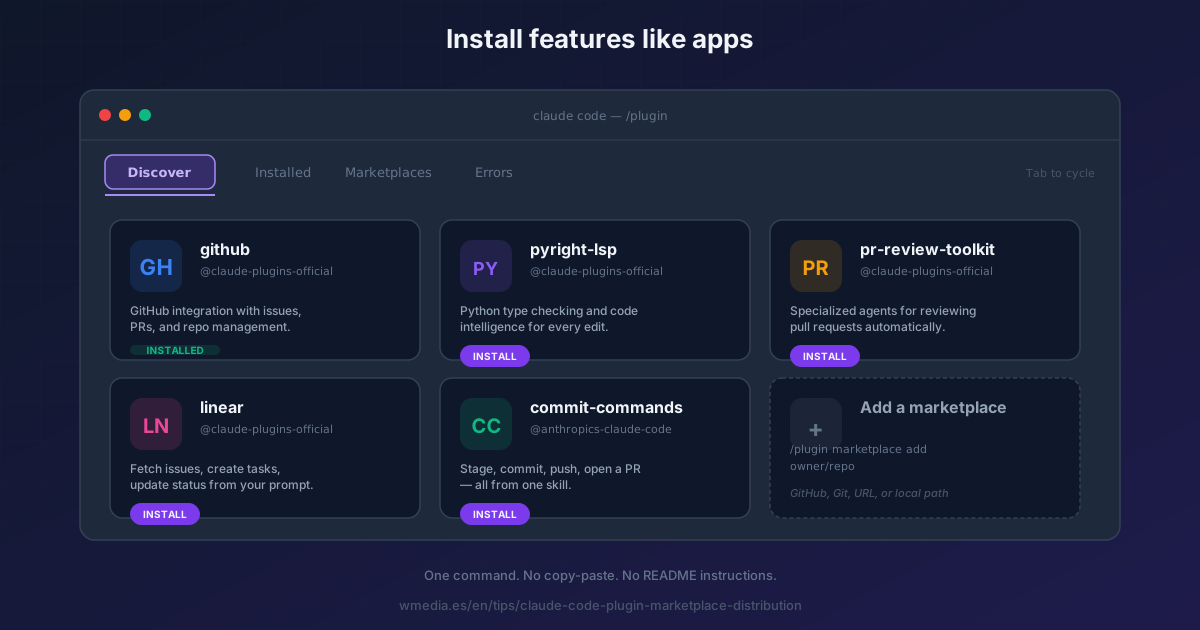
TL;DR Claude Code just got its own app store. You add a "store" (a marketplace) once, browse what's inside, and install features with a single command. Skills, hooks, agents, MCP servers — all packaged as plugins you install and uninstall like apps on your phone.
This is the third time Anthropic has pulled this move. First came MCP in late 2024 — a universal standard for connecting AI to tools and data. Then Agent Skills in October 2025 — packaged capability modules that any AI platform can load. Now plugin marketplaces — the distribution layer that ties everything together.
Before marketplaces, sharing a skill meant copy-paste a SKILL.md file. Sharing a custom subagent meant sending a .md over Slack. Sharing an MCP server config meant hoping everyone used the same paths. Sharing hooks meant documenting them in a README nobody read.
A plugin packages all of that — skills, agents, hooks, MCP servers, LSP servers — into an installable unit. A marketplace is a catalog of those plugins, hosted anywhere (GitHub, git, local, URL), that users add once and browse.
Result:
> /plugin marketplace add anthropics/claude-code
> /plugin install commit-commands@anthropics-claude-code
> /commit-commands:commit
Three commands. From "I heard about this skill" to "it's running in my terminal."
How it works
1. The official marketplace is already there
claude-plugins-official is auto-available the moment you open Claude Code. You don't have to add it. Open the browser to see what's inside:
> /plugin
Four tabs: Discover (all plugins from all your marketplaces), Installed (what you have), Marketplaces (catalog sources), Errors (if anything broke). Press Tab to cycle.
The official marketplace has integrations with GitHub, GitLab, Atlassian, Linear, Notion, Figma, Vercel, Supabase, Slack, Sentry, and language servers for C/C++, Go, Java, Python, Rust, Swift, TypeScript, and more.
2. Add another marketplace
Four source types, each a one-liner:
# GitHub shorthand (most common)
/plugin marketplace add anthropics/claude-code

# Full git URL (GitLab, Bitbucket, self-hosted)
/plugin marketplace add https://gitlab.com/team/plugins.git

# Pin to a specific branch or tag
/plugin marketplace add anthropics/claude-code#v2.0

# Local directory (for testing your own)
/plugin marketplace add ./my-marketplace

# Remote marketplace.json URL
/plugin marketplace add https://example.com/marketplace.json
Adding registers the catalog. No plugins installed yet — that's the next step.
3. Install a plugin
From the /plugin Discover tab, or directly:
/plugin install plugin-name@marketplace-name
Plugins install to your user scope by default. Through the UI you can also install to project scope (shared with teammates via .claude/settings.json) or local scope (just this repo, not shared).
After installing, run /reload-plugins to activate without restarting.
4. Manage marketplaces
/plugin marketplace list        # See what you have
/plugin marketplace update      # Refresh all, or name to refresh one
/plugin marketplace remove name # Also uninstalls its plugins
Shortcut: /plugin market works instead of /plugin marketplace. And rm works as an alias for remove.
5. Create your own marketplace
A marketplace is a git repo (or local directory) with one file: .claude-plugin/marketplace.json.
{
  "name": "my-team-tools",
  "owner": { "name": "Team Platform" },
  "plugins": [
    {
      "name": "code-formatter",
      "source": "./plugins/formatter",
      "description": "Auto-format on save"
    },
    {
      "name": "deploy-tools",
      "source": { "source": "github", "repo": "team/deploy-plugin" }
    }
  ]
}
Push to GitHub. Share the repo name. Anyone on your team runs /plugin marketplace add your-org/your-repo and instantly has access to everything. No copy-paste, no README instructions, no "make sure your paths match."
Before that push, run claude plugin validate over the marketplace and every plugin in it: it tells you which fields Claude Code will ignore at load time, and with --strict it fails your CI. And to watch the new version run before you publish it, --plugin-dir loads your local copy over the one you already have installed, with nothing to uninstall.
FAQ
Do plugins replace my manual skills in .claude/skills/?
No. They coexist. Manual skills at .claude/skills/ keep working exactly as before. Plugin skills live at ~/.claude/plugins/cache/ and are namespaced: /my-plugin:my-skill. Your local customizations are never touched.
What if I already have skills/hooks/agents set up manually?
You can turn them into a plugin by copying them into a plugin directory structure and publishing to a marketplace — see the conceptual guide on plugins for the folder layout. Or keep them manual forever. Both work.
Can I use private marketplaces?
Yes. Claude Code uses your existing git credentials for manual installs. For background auto-updates on private repos, set GITHUB_TOKEN, GITLAB_TOKEN, or BITBUCKET_TOKEN in your environment.
Are these safe?
Plugins can execute arbitrary code with your user privileges. Treat a marketplace like you'd treat installing an npm package — trust the source, read what's in it if it matters. Enterprises can restrict which marketplaces users are allowed to add via managed settings (strictKnownMarketplaces).
The same goes for a plugin that ships a mod, code that runs inside Claude Code and can approve tool calls for you: Claude Code mods shows how to check what one touches before you install it.
Reference
| Command | What it does |
|---|---|
/plugin |
Open the tabbed browser (Discover/Installed/Marketplaces/Errors) |
/plugin marketplace add <source> |
Add a catalog (4 source types supported) |
/plugin marketplace list |
List configured marketplaces |
/plugin marketplace update [name] |
Refresh plugin listings |
/plugin marketplace remove <name> |
Remove a marketplace (uninstalls its plugins) |
/plugin install <plugin>@<marketplace> |
Install a plugin to user scope |
/plugin uninstall <plugin>@<marketplace> |
Remove a plugin |
/reload-plugins |
Apply plugin changes without restarting |
| Source type | Syntax |
|---|---|
| GitHub | owner/repo or owner/repo#branch |
| Git URL | https://gitlab.com/...git |
| Local | ./path/to/marketplace |
| Remote JSON | https://example.com/marketplace.json |
One detail that catches everybody weeks later: the official marketplace refreshes itself and the others don't. How to turn their auto-update on, which is one line.
Official docs: Discover plugins | Create a marketplace | Plugin submission