Update (August 2026) As of 2.1.233, on Opus 4.8, Sonnet 5, Fable 5 and Mythos 5, Claude Code ships without the task tools, so there is no graph to audit until you turn them on with one line in
settings.json: the task list on the newest models.
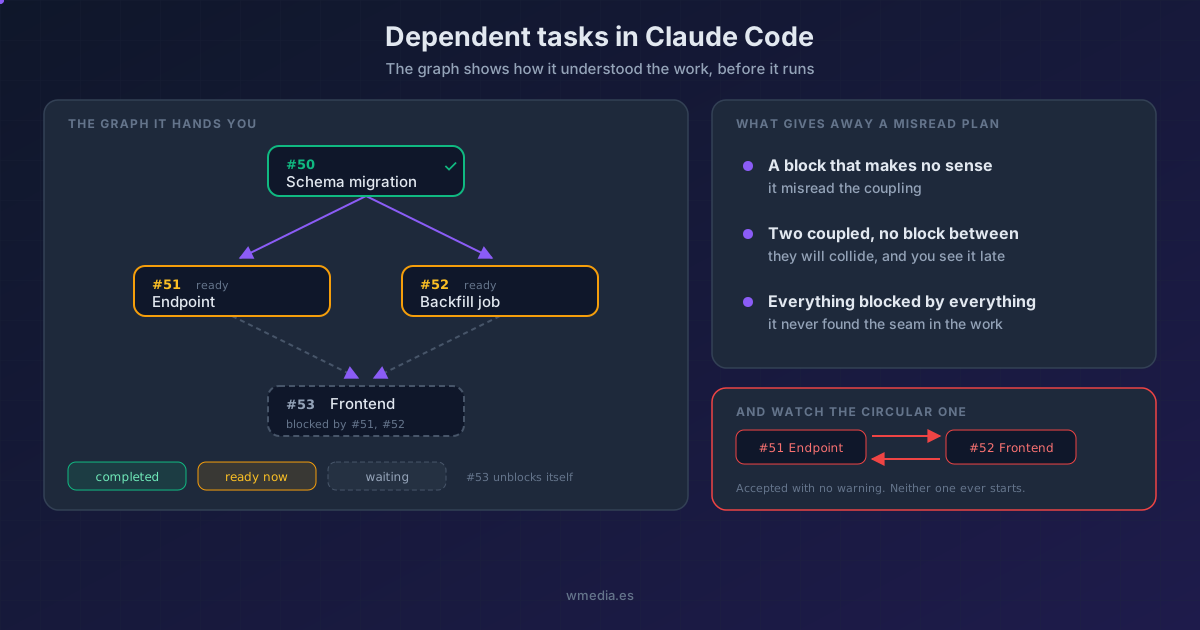
TL;DR Claude Code's task list isn't a list, it's a graph: a task can declare itself blocked by another and can't be picked up until the blocker closes. That turns the list into something else. It stops telling you how much is done and starts telling you how it understood the work, which is exactly what you want to audit before walking away for forty minutes.
Long runs aren't a curiosity anymore. The Fable 5 guide puts it plainly: a single request can run for many minutes, and autonomous runs can extend for hours. And it adds a recommendation almost nobody has read: restructure your harness to check on runs asynchronously rather than blocking on them.
Fine. Except that's where the real problem shows up, and it's documented too: on long runs the model can fabricate progress reports. Anthropic says so outright and ships a prompt to mitigate it (audit every claim against an actual tool result). Which means the text telling you how it's going is not a trustworthy source.
That's what makes the task graph interesting. It isn't prose. It's structure.
Result (real output from this session, three chained tasks):
#50 [pending] Schema migration
#51 [pending] Endpoint that uses the schema      [blocked by #50]
#52 [pending] Frontend that uses the endpoint    [blocked by #50, #51]
1. Ask for them chained, not in a row
You ask for the flat list the way you always did. What changes is asking for the dependencies:
Break this into tasks and chain the dependencies:
mark which task blocks which before you start.
Claude creates them and then declares the blocks. If you want the mechanism underneath, it's two fields, blockedBy and blocks, and either can be added to tasks that already exist.
2. Read it as an audit of the plan, not as progress
This is the shift. When Claude tells you "the frontend is blocked by the migration", it isn't reporting status. It's showing you its mental model of the change.
And you can audit that model in thirty seconds, before it writes a line:
- A block that makes no sense means it misread the coupling.
- Two tasks that do depend on each other coming out as independent is worse: they'll collide, and you'll find out at the end.
- One long chain (everything blocked by everything) usually means it never found the natural seam in the work.
All three are visible in the graph and none of them are visible in a flat checklist. That's the difference from asking for a list so you don't lose the thread: that one you read during, this one you read before.
3. They unblock themselves, which is why what you see holds up
I marked the first task complete. Nothing else touched:
#50 [completed] Schema migration
#51 [pending] Endpoint that uses the schema
#52 [pending] Frontend that uses the endpoint    [blocked by #51]
#51 unblocked itself and #52 dropped #50. The list only shows blocks that are still open, so it prunes itself as the work moves.
That matters more than it looks: what you're reading is derived state, not a summary the model retyped. At any point in the run you can see what's ready to start and what's still waiting, without depending on the narration.
4. Careful: circular dependencies are accepted silently
I tried blocking #51 with #52, which was already blocked by #51:
#51 [pending] Endpoint    [blocked by #52]
#52 [pending] Frontend    [blocked by #51]
It took it without a word of complaint. Two tasks that can never be picked up, zero warnings. On an unattended run you won't notice until you come back and find the work stopped dead. If you ask for dependency chains, read them before you leave.
Where it fits
This is not the /tasks panel, which is the board of your parallel jobs (background bashes, cloud sessions, subagents). This is the checklist of the current task, the Ctrl+T one, and the fact that it has edges.
It slots naturally next to three things you already know:
- With
/goal, which sets the stop condition. The goal says when to finish; the graph says in what order. - With Fable 5, where hour-long runs stop being theoretical and auditing the plan before letting go pays the most.
- With Anthropic's eight tips for Opus 5, which ask you to hand it the complete spec up front. The graph is how you check it understood that spec, and also where you'd notice Opus 5 delegating more than it should, since tasks carry an owner.
Reference
| What | How |
|---|---|
| Ask for the graph | "break this into tasks and chain the dependencies" |
| See the list | Ctrl+T (up to 5 at a time) |
| See all of them | "show me all tasks" |
| Blocks | blockedBy (what blocks it) · blocks (what it blocks) |
| When the blocker completes | The block drops off the dependents on its own |
| Owner | Each task can carry one, which is how agents divide the work |
| Circular | Accepted with no warning: a silent deadlock |
Official docs: Interactive mode: Task list · Prompting Claude Fable 5
Requirements
- Checked on Claude Code v2.1.220. Dependencies don't appear on the interactive-mode page, which only describes the flat checklist: everything above comes from exercising the tasks in a real session.
- As of v2.1.233, the newest models also need
CLAUDE_CODE_ENABLE_TODO_TOOLS.