TL;DR Run
/autocompact. It shows your window and where it came from:default for this model,from settings, orfrom CLAUDE_CODE_AUTO_COMPACT_WINDOW. If it is not the model's own and you cannot name who changed it,/autocompact autoputs it back.
The auto-compact window is how full the context can get before Claude Code summarizes the conversation on its own. The real threshold is the smaller of that window and your model's maximum context, so setting it above the model buys you nothing.
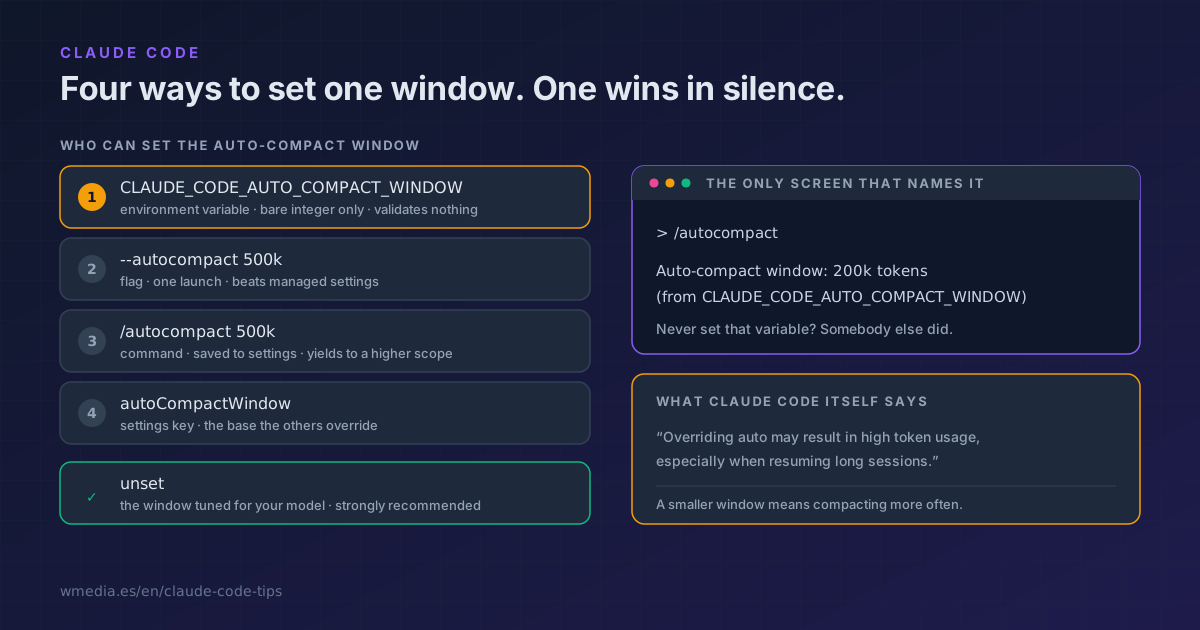
The number is not the interesting part. Four different places can set it, one of them beats the other three without announcing it anywhere, and there is exactly one screen where you can see which one won.
Result:
> /autocompact

Auto-compact window: 200k tokens (from CLAUDE_CODE_AUTO_COMPACT_WINDOW)
That parenthesis is the whole tip. If it reads from CLAUDE_CODE_AUTO_COMPACT_WINDOW and you never set that variable, somebody decided for you: a .zshrc from months ago, your team's startup script, a container image.
Four places, and one wins in silence
1. Nothing. Leave it alone and Claude Code uses the window it has tuned for your model. It shows up as default for this model.
2. The /autocompact 500k command. It saves to your user settings under the autoCompactWindow key and applies to the current session right away. If a higher-priority scope, your company's managed settings for instance, already holds that key, the command saves your value but the session keeps the scope's window, and it tells you so on screen. Same hierarchy you already met in when CLAUDE.md, skills, and MCP collide.
3. The --autocompact 500k flag at launch. It overrides your saved setting for that launch without changing it. And unlike the command, no higher scope can preempt it: the flag wins even when managed settings say otherwise.
4. The CLAUDE_CODE_AUTO_COMPACT_WINDOW variable. While it is set, it beats the command, the flag and the setting. And /autocompact stops changing anything: it switches to reporting the override back at you.
The four do not accept the same formats. The command and the flag take 200000, 500k, 1M, and even 200 as shorthand for two hundred thousand, and they reject anything outside 100K to 1M with an explicit error:
claude --autocompact 50
# error: option '--autocompact <auto|tokens>' argument '50' is invalid.
# It must be 'auto', or between 100k and 1M (e.g. 500k, 200000, or 200 as shorthand)
The environment variable understands the bare integer and nothing else. I handed it banana and Claude Code started up without a word of complaint. That is the real problem: the one that outranks the others is the only one that validates nothing.
Why it should not be you
This is where intuition goes wrong. You would think a smaller window saves tokens, because it compacts sooner and the conversation weighs less on every request. Claude Code says the opposite, in these words, inside /autocompact:
The auto setting picks a window tuned for your model and is strongly recommended for the best cost and performance.
And when it detects that you overrode it, through settings or through the variable, it adds this warning:
Overriding auto may result in high token usage, especially when resuming long sessions.
Compacting sooner means compacting more often, and every compaction is an extra call that summarizes the whole conversation. Resume a few long sessions and it adds up. And that call does not cost the same every time: it depends on whether your cache is still alive when it fires, which is exactly why it pays to compact before a long break rather than when you get back. So the value here is not picking a better number: it is finding out you have one set without knowing. And if you want to see on your own machine what long context is actually costing you, /usage flags it as a behavior and puts a percentage on it: the breakdown of what's eating your limit.
If what you actually want is control over when compaction fires rather than how big the window is, that is a different knob: the threshold percentage in CLAUDE_AUTOCOMPACT_PCT_OVERRIDE, already covered in the 1M context tip. And if your worry is what gets lost in the process, that lives in what survives a /compact.
How to put it back
1. Ask who is in charge
/autocompact
Read the tail of the line. If it says default for this model, you are done.
2. If the source is an environment variable, hunt it down
env | grep AUTO_COMPACT
Check your .zshrc, your .bashrc and any project startup script too. The variable wins from wherever it lives.
3. Hand it back to the model
/autocompact auto
One catch: if the override comes from the environment variable, the command will report it but cannot change it. There you have to unset the variable and open a fresh session.
Reference
| Where | Scope | Formats accepted | Priority |
|---|---|---|---|
CLAUDE_CODE_AUTO_COMPACT_WINDOW |
Process and scripts | Bare integer only (200000) |
Beats everything else |
--autocompact |
One launch | 200000, 500k, 1M, 200, auto |
Beats the setting and managed settings |
/autocompact |
This session and later ones | 200000, 500k, 1M, 200, auto |
Yields to a higher scope |
autoCompactWindow in settings |
Whatever the file's scope is | Token integer | The base the others override |
| Unset | Everything | Not applicable | The window tuned for your model |
Source labels the command can show you: auto, from settings, from CLAUDE_CODE_AUTO_COMPACT_WINDOW, default for this model, and default for an unrecognized model, that last one typical of a gateway or a model ID Claude Code does not recognize. When the configured window exceeds the model's context, it appends · capped to X by model.
Official docs: Model configuration, set the auto-compact window